

Most contractor scheduling mistakes come from the same few places: durations that are too hopeful, no room for weather or sub availability, updates that come too late, and a calendar that is only as full as the calls you managed to answer. Fix those and your jobs start closer to on time. This guide goes through each mistake, shows where it goes wrong and gives you a fix you can use this week. It also covers the one mistake that happens before a job is even on the calendar: the missed call. If you run a service business, we built LeadGuard to answer every call and book appointments from real-time availability.
TL;DR
- Use realistic durations based on how long work actually took before, not on what the client wants to hear.
- Confirm dates with subs and suppliers, and build weather days and float into the schedule.
- Update the schedule weekly and tell the client within 24 hours when dates move.
- Spot a slipping schedule early: shrinking float and tasks carried forward week after week are the signs.
- Protect the front end too: a missed inquiry is a job that never reaches the calendar.
Table of Contents
- Mistake 1: Setting durations to please the client
- Mistake 2: Vague schedules with no dependencies
- Mistake 3: Not checking crews, subs and suppliers
- Mistake 4: No weather days and no float
- Mistake 5: Updating the schedule too rarely
- Mistake 6: Telling the client late
- Mistake 7: Losing jobs before they reach the schedule
- How to tell your schedule is already slipping
- Our perspective
- Put a plan on every incoming call
- FAQ
- Sources
Mistake 1: Setting durations to please the client
Looks like a small thing, but it is where most slipped schedules start. A client asks for six weeks. You say yes. Then the real work takes eight.
Contractor Foreman ties nearly one-third of delays to overly ambitious timelines and says idle crews can cost over $10,000 a day in labor. A Fine Homebuilding article on scheduling says errors in time estimates cause most schedule slippage.
The U.S. Department of Energy’s scheduling guidance gives a good rule. Use “most likely” durations, not best case or worst case. Add margin for risk instead of squeezing durations to hit a target.
How to fix it
- Keep a simple log of how long each type of work really took on your last jobs.
- Use those numbers for the next estimate. Fine Homebuilding suggests the same habit: log actual time, then adjust.
- If you are unsure about a trade, ask the sub for their own time estimate.
- Do the math from the ground up: quantity of work divided by how much a crew produces per day, adjusted for crew size and working hours. WiiGroup recommends this method over gut feel.
A worked example: a crew lays 400 square feet of tile in a good day. The bathroom floor is 120 square feet. That is less than one day on paper. But the first day includes setup, a trip for supplies and cleanup. Your log says similar floors took two days. Schedule two.
Be careful with peak productivity numbers too. SmartPM notes that schedules built on a crew’s best output do not hold up in the field because of learning curves, tight sites and weather.
Mistake 2: Vague schedules with no dependencies
A list of tasks with dates is not a schedule. A schedule shows what has to finish before the next thing can start. Without that, one late task quietly pushes five others and nobody sees it coming.
Procore names missing dependencies and not enough detail among the common mistakes. Construction Dive reports that the leading cause of delays is poor handoffs between trades.
How to fix it
- Write down for each task what must be done first. Rough-in before drywall. Inspection before cover-up.
- Break big blocks like “finish interior” into pieces a crew lead can check off.
- Overlap trades, but not too much. One remodeling contractor in Fine Homebuilding says to overlap enough, but not so much that they step on each other.
- Know which tasks have no slack. Tasks on the critical path, the chain that sets your finish date, deserve your attention first. Non-critical tasks can move a little without changing the end date, as Contractor Foreman explains.
Mistake 3: Not checking crews, subs and suppliers
A first-draft schedule is a guess until the people in it say yes. A remodeling article in the Journal of Light Construction advises you to call and confirm every date with subs and suppliers. Its example: a primary plumber who is usually booked six to eight weeks out. Either the schedule bends to that plumber or you find another one.
How to fix it
- Confirm dates by phone or text, not just in the schedule file.
- Call subs and suppliers again about two weeks before they are due. Sage 100 Contractor’s guidance suggests calling twice a week for tasks two weeks out.
- Map long-lead items as part of the schedule from day one. SmartPM gives an example: steel arriving four weeks late can wipe out float that looked fine at the start.
- Plan for holidays and vacation requests before they land on you.
- Show clients what indecision costs. The same remodeling article says that if a client sees a three-week countertop lead time up front, they tend to decide on time.
Mistake 4: No weather days and no float
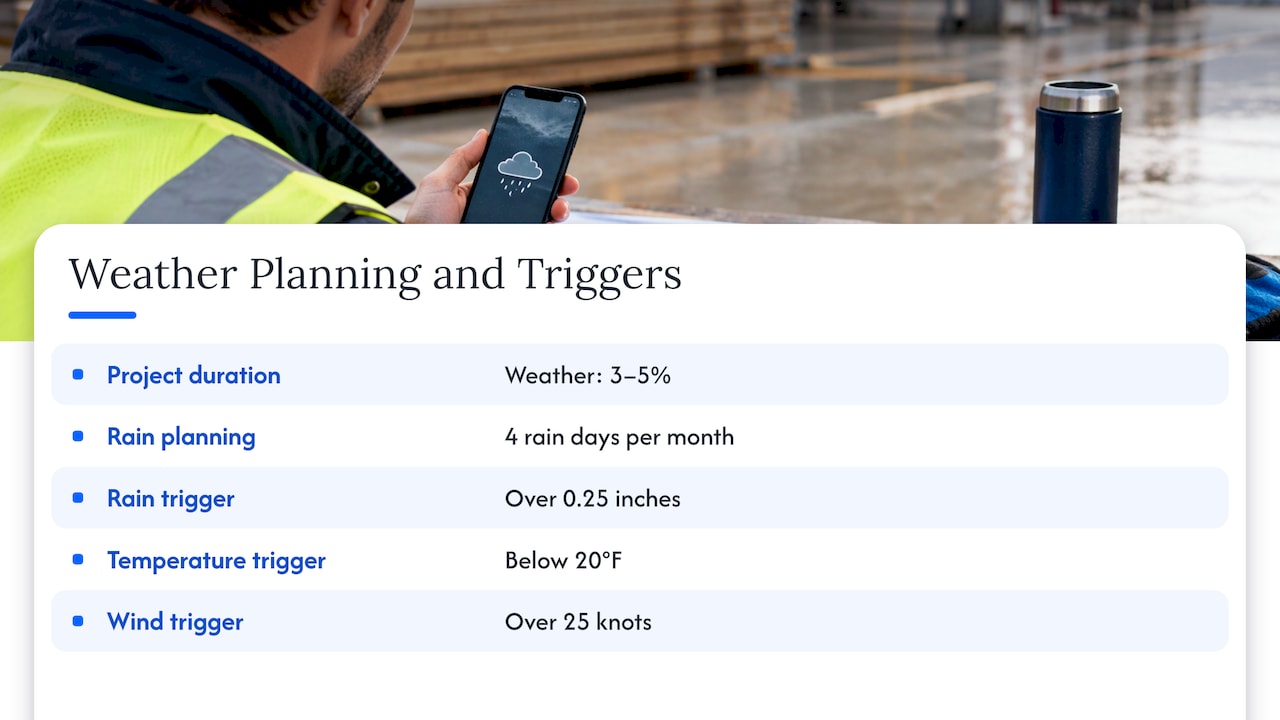
Weather is not a surprise. It is a normal part of the job. Contractor Foreman says weather can account for 3% to 5% of a project’s duration.
So plan for it by place and season. SimplyWise advises checking historical weather for your region. If the average is four rain days a month, build four rain days into each month of exterior work. Contractor Foreman describes a Pacific Northwest contractor who preloaded seven weather days into a February schedule.
Put it in the contract too. Define what counts as a weather day. Contractor Foreman’s examples are rainfall over 0.25 inches, temperatures below 20°F or wind over 25 knots. CONEXPO-CON/AGG also advises you to clarify who pays for weather-related costs.
Float is the same idea for everything else. A generic buffer tacked on at the end hides problems. Float spread where risk really is gives you room to absorb a late delivery without moving the finish date.
Mistake 5: Updating the schedule too rarely
A schedule that is not updated is a drawing. BuilderSolve recommends a weekly update on a fixed day, using actual field completions and noting why each date moved.
Monthly is too slow. SmartPM says that by the time a monthly update shows a two-week slip, the project is often three weeks behind.
If you work on federal contracts, the rule is firm. Under the clause at 48 CFR 552.236-15, unless a different period is stated, the contractor updates the schedule weekly and submits it by the following Monday. Any revision needs a written narrative covering the reason and the effect on completion and float. Private jobs do not need that formality, but the weekly habit still pays.
A simple weekly routine
- Pick one day, such as Friday.
- Record what actually got done, not what was planned.
- Drop the finished week off a three-week look-ahead and add a new third week. Plan of Day describes this look-ahead method, and it forces you to check permits, inspections and predecessor work each week.
- Save each update as its own version so you can see what changed.
- Send the next three weeks to subs and the client.
The data shows why accuracy matters. Vortex Control’s 2025 report found that 45% of schedule updates changed actual start or finish dates, and one in three had percent-complete numbers that did not match durations.
Mistake 6: Telling the client late
Clients can handle a delay. They do not handle surprises. SimplyWise suggests a 24-hour rule: when the schedule is shifting, tell the client within a day. Say what changed and why, how many days it affects, what you are doing about it and the new target date for the next milestone.
Put change orders in writing too. Projul recommends listing the cost and schedule impact and getting a signature before work starts. A short, plain note beats a long apology.
Mistake 7: Losing jobs before they reach the schedule
This is the mistake most scheduling guides skip. A full, well-built schedule still needs jobs to fill it. If you are on a roof or under a sink when the phone rings, that call goes to voicemail. Many callers will not leave a message. They call the next contractor on the list.
The messy part is what comes after the call. A job inquiry gets written on a sticky note. The note gets lost. Nobody checks your real availability before promising a date. The next day you realize you double-booked a crew, and now you are rescheduling a job that has not even started.
To keep the front end clean, you need three things:
- Every call answered, including after hours and during jobs.
- A quick set of questions so you know the job type, location and urgency.
- A booking that matches who is actually free, not who you hope is free.
That is what our platform is built for. It answers every incoming call right away with 24/7 AI support, with no voicemail. It qualifies the lead and books an appointment based on real-time availability. It sends instant notifications and SMS follow-ups. For teams with more than one phone or crew lead, smart routing sends the call where it should go. If you want to see how routing works, our guide to round robin call routing walks through a setup.
How to tell your schedule is already slipping
Sometimes you are reading this with a job that is already off track. Look for these signs, listed in a schedule recovery guide from R Construction Solutions:
- Float shrinks two updates in a row.
- Tasks sit “in progress” with little change.
- The same tasks are carried forward in the look-ahead week after week.
- Work is happening out of sequence.
- Field dates do not match the schedule.
If two or more show up, the guide advises getting an honest field update, finding the real critical path, tagging the cause of each delay, clearing look-ahead constraints, choosing recovery moves and tracking weekly. Rebaseline only if the contract allows it.
Act sooner rather than later. Vortex Control found that most projects do not start compressed because early float absorbs small issues, but compression builds after the halfway point and spikes in the final quarter when float is gone. A recovery schedule is the contractor’s plan to finish earlier than currently predicted, as AACE International’s recovery scheduling reference defines it.
One more number to keep in mind. A survey of 150 construction leaders by STARC Systems and Construction Dive Studio found only one in three contractors say most projects start on time, and 79% rated better project planning as the most successful tactic. Good planning starts at the first phone call.
Our perspective
Looks like most scheduling advice starts after the job is won. We think it starts earlier, with the call.
When a contractor misses a call, the schedule never sees that job. When a call is answered but the details are thin, the schedule gets a job with the wrong crew, the wrong date or the wrong scope. Both are scheduling mistakes. They just happen before anyone opens a calendar.
That is why we built LeadGuard around the first contact. Every call is answered right away, with no voicemail. The AI qualifies the lead, then books an appointment based on your real-time availability. You get an instant notification, and the customer gets an SMS follow-up. Smart routing sends calls to the right person.
We think a contractor should spend the day doing the work, not chasing a ringing phone. Weekly updates, honest durations and weather days keep jobs on track. A booked, qualified calendar keeps the next jobs coming.
Jim
Put a plan on every incoming call
If missed calls are costing you jobs, LeadGuard is our answer for service businesses. It answers calls 24/7, qualifies leads, books appointments from real-time availability, routes calls and sends notifications and SMS follow-ups. It also connects to appointment scheduling automation through Make.com.

Plans are published at leadguard.org: Starter at $97 per month, Professional at $147 per month and Enterprise at $197 per month. You can look at the Starter plan first, or compare all three on the site and pick the one that fits your team.
FAQ
What is the most common contractor scheduling mistake?
Setting unrealistic durations is the one that shows up most. It often happens when a contractor shortens the timeline to win the client. Nearly one-third of delays are tied to overly ambitious timelines, according to Contractor Foreman. Use your own job history and add room for risk.
How often should I update my job schedule?
Weekly is a good default. Pick a fixed day, record what was actually finished and send the next three weeks to subs and the client. Monthly updates are usually too slow to catch a growing slip. Federal contracts generally require weekly updates unless a different period is stated.
How do I fix a schedule that is already behind?
Start with an honest field update and find the real critical path. Note the cause of each delay, clear what is blocking the next three weeks and pick recovery moves such as re-sequencing or adding crew time. Then track progress weekly, as the recovery guide outlines.
How many weather days should I plan for?
Use historical weather data for your area and season. If your region averages four rain days a month, plan four rain days in each month of exterior work, as SimplyWise advises. Define a weather day in your contract so everyone agrees on what counts.
How do I stop missed calls from hurting my schedule?
Make sure every call is answered and every inquiry is captured with the job type, location and urgency. Then book against real availability. LeadGuard does this around the clock, with no voicemail and with SMS follow-ups, so new work reaches your calendar.
Sources
- Construction Scheduling Mistakes That Cost Contractors Time and Money, Contractor Foreman
- Top 5 causes of construction delays, Construction Dive
- Project Scheduling in Construction, WiiGroup
- Developing an Effective Integrated Master Schedule, U.S. Department of Energy
- Smart Scheduling, Fine Homebuilding
- The Complete Guide to Construction Project Planning, SmartPM
- Remodelers, Journal of Light Construction
- Tips for managing a project schedule, Sage 100 Contractor
- Construction Scheduling Best Practices for Contractors, SimplyWise
- Winter-Proofing Your Construction Business, CONEXPO-CON/AGG
- Update the Construction Schedule Weekly, BuilderSolve
- 48 CFR 552.236-15, Schedules for Construction Contracts
- Free Three-Week Lookahead Schedule Template, Plan of Day
- State of Construction Scheduling 2025, Vortex Control
- Construction Client Communication: Tips and Templates, Projul
- Construction Schedule Recovery: How to Catch Up Fast, R Construction Solutions
- 54R-07: Recovery Scheduling, AACE International
- What’s Really Causing Project Delays, STARC Systems and Construction Dive Studio