
Quick Summary
The best smith.ai alternatives for small business depend on whether you need automated booking, flat monthly pricing, or human backup. LeadGuard is ranked first for appointment booking and missed-call coverage, while AI-first options like Upfirst and Rosie AI suit businesses wanting predictable monthly costs. Compare each provider’s total cost against your own call volume before choosing.
- Human-staffed answering services often bill per call or minute, which makes monthly costs hard to predict.
- Map your five most common call types to see whether AI-only or hybrid answering fits better.
- Build a call profile with monthly calls, average duration, and peak-week volume before requesting quotes.
- Compare overage rates, setup fees, and minimum terms, since these often drive the real total cost.
- Test each provider with your own services, hours, and after-hours calls before committing.
Table of Contents
- Why Small Businesses Look Beyond Smith.ai
- How Receptionist Models Differ: AI, Human, and Hybrid
- Top Smith.ai Alternatives Ranked for Small Business
- Side-by-Side Comparison: Features, Availability, and Pricing Models
- Smith.ai Pricing vs. Alternatives: Normalizing the Real Monthly Cost
- AI Receptionist for Small Business: Fit by Call Volume and Industry
- Choosing a Small Business Phone Answering Service: Booking, Integration, and Setup
- Booking Your Demo: Testing an AI Call Answering Service With Appointment Scheduling
- Frequently Asked Questions
Why Small Businesses Look Beyond Smith.ai
Smith.ai is a well-known option for outsourced call answering, but it is not the only path. Many small businesses start looking for smith.ai alternatives when per-call billing becomes hard to predict, when they want more automation, or when they need a receptionist model that fits their call volume. At LeadGuard, we see this question come up most often from home service companies that miss calls after hours and need a faster way to book jobs.
The core issue is cost structure. Human-staffed answering services typically charge by call or by minute, so a busy week can produce a bill that feels unpredictable. A plumbing company handling 15 to 20 calls a day faces a very different economics problem than a law firm taking a handful of intake calls. Owners who run the numbers often find that a flat or tiered plan is easier to budget.
Other owners look beyond Smith.ai because they want something other than a human receptionist. Missed-call coverage, instant answering, and automatic scheduling can matter more than a warm voice for certain businesses. Auto repair shops and medical spas, for example, often care most about booking speed and lead qualification. The right alternative depends on what problem you are trying to solve first.
How Receptionist Models Differ: AI, Human, and Hybrid
Before comparing providers, it helps to understand the three main models. An AI-only receptionist answers calls with automated voice technology, handles routine questions, and books appointments. A human-only service uses trained staff who take messages and transfer calls. A hybrid model combines both, with AI handling first contact and people stepping in for complex or sensitive calls.

Each model fits different businesses. AI-only tools tend to work well for high volumes of simple requests, such as scheduling service visits or confirming availability. Human services suit calls that need judgment, such as legal intake or emotionally charged customer issues. Hybrid setups aim to get the best of both, though they usually cost more than AI alone.
A practical test: list your five most common inbound call types. If most can be resolved with a question, a booking, and a summary, an AI-first model is likely a strong fit. If many require judgment, prioritize providers that offer human backup.
Top Smith.ai Alternatives Ranked for Small Business
We rank these options by fit for small businesses rather than by overall size. Our top pick is LeadGuard, because it is built specifically around capturing and booking leads.
LeadGuard: Automated Call Handling With Make.com Integration
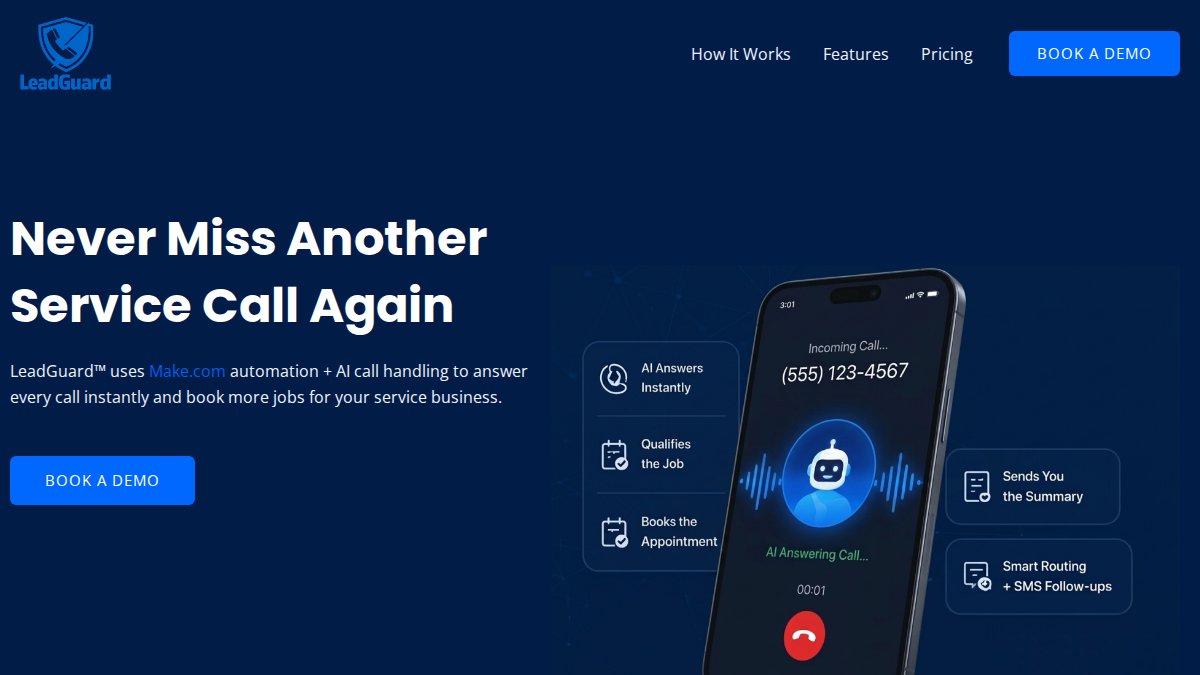
LeadGuard is built for service businesses that want calls answered instantly and booked automatically. It answers incoming calls with no rings or voicemail, qualifies the caller, and schedules appointments into your calendar. Summaries are delivered by SMS or email, and it integrates with Make.com.
Best for: Home service companies and medical spas that need automatic appointment booking and missed-call coverage.
Skip if: You need a live human to handle highly emotional or legally sensitive conversations.
Upfirst, Goodcall, and Rosie AI: AI-First Options
These three providers center on AI-based call answering, which makes them the closest direct comparisons to LeadGuard’s model.
Goodcall and Rosie AI are also AI-based options. Verify features, pricing, and integrations directly with each provider before committing.
Best for: Small businesses that want automated answering and a clear monthly price.
Skip if: You need deep calendar or CRM integration that you cannot verify in advance.
Ruby, AnswerConnect, Abby Connect, PATLive, AnswerForce, and Dialzara
This group includes call-answering services that appear frequently in Smith.ai comparisons. Several of these providers offer human or hybrid answering, while Dialzara is an AI call-answering option. Request a quote from each provider to confirm pricing.
Best for: Businesses that want to compare several answering providers before choosing one.
Skip if: You need transparent, upfront pricing you can plan around without a sales conversation.
Side-by-Side Comparison: Features, Availability, and Pricing Models
| Provider | Model | Published Starting Price | Pricing Structure | Best For |
|---|---|---|---|---|
| LeadGuard | AI-powered, automated | See pricing page | Subscription | Booking and lead qualification |
| Upfirst | AI-only | $24.95/month | Call-volume tiers | Low-cost AI answering |
| Goodcall | AI phone agent | Contact for pricing | Not specified | Automated small-business calls |
| Rosie AI | AI-based | $49/month | Subscription | AI answering with a monthly plan |
| Ruby | Call answering | Contact for pricing | Not specified | Quote-based comparison |
| AnswerConnect | Call answering | Contact for pricing | Not specified | Provider evaluation |
| Dialzara | AI call answering | Contact for pricing | Not specified | AI option to compare |
Availability is the other dimension to compare. Confirm whether each provider answers around the clock, how it handles overflow during peak hours, and what happens when a call falls outside its scope.
Smith.ai Pricing vs. Alternatives: Normalizing the Real Monthly Cost
Headline rates are the least useful number in this category. Headline rates are only meaningful once you apply real call volume, average call length, overage rates, and minimums. The only way to compare a Smith.ai alternative for small business use is to normalize every provider to the same call profile.
Build your call profile first
Before you request a single quote, write down four numbers from your phone records or CRM:
- Monthly inbound calls. Pull the last three months and average them. Include after-hours and weekend calls, since those are often the ones you are trying to capture.
- Average call duration. Most small-business service calls run a few minutes; intake and sales calls run longer. Use your own average, not a vendor’s.
- Monthly minutes. Multiply calls by average duration. This is the number per-minute providers will bill against.
- Peak-week multiplier. Your busiest week is often 1.5x to 2x your average. Ask each provider what happens in that week.
Call volume varies widely by business type, so match your plan tier to your own measured call profile.
The five cost lines to compare
Every quote should be broken into the same five lines so you can put them side by side:
- Base plan price. The published or quoted monthly fee for a stated call or minute allowance.
- Included volume. How many calls or minutes the base price covers, and whether unused volume rolls over.
- Overage rate. The per-call or per-minute charge once you exceed the allowance. This is where unpredictable bills come from.
- Setup and onboarding fees. Number porting, script building, integration setup, and custom greetings are sometimes billed separately.
- Minimum term and cancellation. Month-to-month, annual, and notice periods change your real cost if the service does not fit.
A worked example
Suppose your profile is 500 calls a month at 3 minutes each, 1,500 minutes. Here is how the same profile can produce very different totals depending on structure:
- Flat subscription with a call allowance. If a plan includes 300 calls at a published rate and charges an overage per call beyond that, your 200 extra calls are billed at the overage rate. Ask for that rate in writing; it is frequently the largest line on the invoice.
- Per-minute billing. At 1,500 minutes, the per-minute rate matters more than the headline plan price. A plan that looks cheap per call can be expensive if your calls run long.
- Tiered plans. If the next tier up costs less than your projected overage, the higher tier is the cheaper choice. Providers rarely point this out; run both numbers.
- Quote-only providers. When pricing is not published, request a written quote for your exact profile, 500 calls, 1,500 minutes, after-hours included, and ask specifically for the overage rate, setup fee, and minimum term.
Watch out: a low-volume business can overpay on a plan built for higher volume. If you receive only a handful of qualified leads a month, ask whether a smaller tier or a pay-as-you-go option exists before signing an annual term.
Questions to put in every quote request
Send the same short list to each provider so the answers are comparable:
- What is the base price, and how many calls or minutes does it include?
- What is the overage rate per call and per minute?
- Are after-hours, weekend, and holiday calls billed differently?
- Is there a setup, porting, or integration fee?
- What is the minimum term, and what notice is required to cancel?
- Are there any per-seat or per-user charges?
LeadGuard pricing is available on its pricing page, and a free trial is offered. Review the pricing page or book a demo for current details, and compare totals against your own call profile rather than headline rates. The goal is not the lowest sticker price, it is the most predictable total for your actual call pattern.
AI Receptionist for Small Business: Fit by Call Volume and Industry
Most buyers pick a receptionist model by gut feel. A better approach is to score two variables, call volume and call complexity, and let the score point to AI-only, live answering, or hybrid. The thresholds below are practical starting points, not rules; adjust them to your own records.
Score your call volume
- Under about 100 calls a month. You are likely paying for capacity you do not use on most plans. A pay-as-you-go or low-tier AI plan usually wins, and a shared live answering service can work if calls are simple.
- About 100 to 400 calls a month. This is the sweet spot for AI-first service with human backup. Volume is high enough that per-call pricing gets expensive, but not so high that you need a dedicated receptionist.
- About 400 to 800 calls a month. Tiered plans start to matter, and overage rates become the deciding cost line. Hybrid models earn their price here because AI absorbs the routine calls and people handle the rest.
- Above about 800 calls a month. At this volume, a dedicated or semi-dedicated live arrangement or a well-configured AI system with escalation rules is usually cheaper per call than a generic plan.
Score your call complexity
List your five most common inbound call types and mark each as routine (answer a question, book a slot, take a message, confirm availability) or judgment (pricing negotiation, complaint, legal or medical intake, high-value sales).
- Mostly routine. AI-only is a strong fit. Instant answering and automatic booking matter more than a warm voice.
- Mostly judgment. Live answering or hybrid is the safer choice. Automation can still handle first contact and routing.
- Mixed. Hybrid, with AI handling first contact and clear escalation rules for the judgment calls.
Industry patterns
- Home services (plumbing, HVAC, electrical, landscaping). Calls are frequent, short, and booking-driven, with a heavy after-hours share. Instant answering and automatic scheduling usually matter more than scripted conversation. A missed after-hours call is often a lost job, so confirm the provider answers around the clock.
- Medical spas and salons. Appointment scheduling tied to provider availability is the core need, plus reminders. Confirm the service can see real availability and write directly to your calendar, not just take a message.
- Auto repair shops. Calls split between quote requests and urgent repair questions. Lead qualification that separates the two saves time at the front desk.
- Legal and professional services. Intake calls need careful qualification and a clear path to a human. Prioritize escalation rules and confidentiality handling over raw speed.
- Specialty equipment and high-ticket sales. A human usually closes the call, but AI can cover first contact, qualify the caller, and route to the right person.
A simple decision rule
If your calls are mostly routine and you take more than about 100 a month, start with AI-only and test it against your real call flow. If most calls need judgment, start with live or hybrid. If you are mixed and above roughly 400 calls a month, hybrid is usually the best balance of cost and caller experience.
Watch out: a provider that looks affordable at your average volume can become expensive in your busiest week. Check the overage rate and peak handling before you commit, and confirm what happens when a call falls outside the service’s scope, whether it transfers to you, takes a message, or drops.
Choosing a Small Business Phone Answering Service: Booking, Integration, and Setup
Three factors decide whether a service works in practice: booking, integration, and setup. Start with booking. Confirm that the service can see your real availability and write appointments directly to your calendar, not just take a message.
Next, check integration. If you run an older or custom calendar system, ask the provider to confirm compatibility before you sign. Integration with Make.com can help bridge gaps, but test it with your actual software.
Finally, plan setup. Ask how long onboarding takes and whether an office manager can complete it without IT help. Most small teams can configure a basic setup in a few sessions, but custom integrations take longer.
Booking Your Demo: Testing an AI Call Answering Service With Appointment Scheduling
The best way to judge any service is to test it with your own call flow. Book a demo with LeadGuard and ask for a walkthrough using your real services, hours, and booking rules. Make test calls after hours, during peak times, and with questions outside the normal script.
During the test, check three things: whether the caller hears a professional response, whether the appointment lands in the correct calendar slot, and whether the summary arrives quickly by SMS or email. Repeat the same test with two or three alternatives so you can compare results side by side.
Ready to see how it handles your calls? Book a demo with LeadGuard and run your own test this week.
Last Updated: November 12, 2026
Frequently Asked Questions
What are the best alternatives to Smith.ai for small businesses?
Alternatives include AI-based services such as Upfirst, Goodcall, Rosie AI, and Dialzara, along with human or hybrid answering providers such as Ruby, AnswerConnect, Abby Connect, PATLive, and AnswerForce. The right choice depends on whether you need after-hours coverage, appointment booking, or a human voice for complex calls. LeadGuard is an option for service businesses that want automated call answering, lead qualification, and appointment scheduling connected to a calendar through Make.com. Compare each provider’s call handling, booking, and integration features against your own call volume before deciding.
How much does Smith.ai cost for a small business?
Smith.ai pricing depends on plan level, call volume, and add-on features, and the supplied research does not verify a specific monthly figure. Check Smith.ai’s current pricing page or request a quote for accurate numbers. When comparing, ask each provider how overage charges, setup fees, and per-call or per-minute billing are handled. A low headline price can cost more if you exceed included call volume, so calculate your expected monthly calls before comparing totals.
Can an AI receptionist qualify leads and book appointments?
Many AI receptionist services can ask intake questions, record caller details, and book appointments based on calendar availability. LeadGuard offers automated lead qualification and automatic appointment scheduling, with instant summaries delivered by SMS or email. Confirm during a demo that the system can read your specific calendar and that it routes urgent calls correctly. Test a few sample calls to see how well the qualification questions match the work your team handles.
Is an AI receptionist a good alternative to a live answering service?
An AI receptionist works well for high call volumes, after-hours coverage, and routine booking tasks, because it answers instantly and does not need staffing for overnight shifts. A live answering service is better when callers have complicated questions, emotional situations, or need nuanced judgment. Many small businesses use a hybrid model, with AI handling first contact and humans stepping in for exceptions. Decide based on how often your calls require judgment rather than routine information.
